| |New Reviews| |Software Methodologies| |Popular Science| |AI/Machine Learning| |Programming| |Java| |Linux/Open Source| |XML| |Software Tools| |Web| |Other| |Tutorials| |All By Date| |All By Title| |Resources| |
 |

Independent developer book reviews by and for practitioners |
|
|
|
||
|
The Man From The Future
John von Neumann was one of the intellectual giants of the 20th century — a giant among giants, but yet he remains little known to the general public. Compare and contrast to Alan Turing for example, who has carved out a place in popular culture. Even John Nash had a Hollywood biopic. Yet von Neumann was a key figure in maths, physics, economics and computer science. The machine you're reading this on has a von Neumann architecture, and is a descendant of the first programmable computers that he helped develop. So it's more than welcome that there's finally a pop science biography of this instrumental figure. Ananyo Bhattacharya's The Man From The Future is definitely in the pop science mould rather than a more detailed and scholarly work. It's an easy read for the general reader, charting von Neumann's short life (he died at 53, still in his prime) and work, from birth in Budapest in 1903 to early death in Washington DC in 1957. Born into an upper middle—class secular Jewish Hungarian family, he was an archetypal child prodigy, mastering Ancient Greek and Latin, able to accomplish feats of mental arithmetic that astounded adults and devouring volumes of history. He was one of a generation of Hungarian scientists who went on to make major contributions to science and mathematics: Michael Polanyi, Leo Szilard, Eugene Winger, Edward Teller and others. The book describes von Neumann's numerous contributions to mathematics and science starting with his work, while still a teenager, on set theory and the fundamentals of mathematics. The author always make sure to contextualise von Neumann's work, placing it in the bigger picture to make plain just how central and important much of von Neumann's work was. Along the way one is reminded of the intellectual ferment that marked the first decades of the 20th century. [Continued]
Racket Programming the Fun Way
I have to admit that I've never really taken a shine to programming languages along the Lisp line of descent. There's a long and distinguished history of course, and numerous variants such as Scheme, Clojure, Hy and more. It's not that I'm only comfortable using one programming paradigm — in my time I've professionally used assembler, C, APL, Visual Basic, Java, Powershell and half a dozen others. But for one reason or another nothing Lisp-like has ever appealed. Paul Graham did a good job expounding on the virtues of Lisp, but even that wasn't enough. Until now — and until this book. This is a book for hobbyists — it's not a manual to teach you to program or help you get a job writing code. And beware that the word fun in the title is a specific kind of fun, the kind that appeals to people who like recreational mathematics or exploring abstract ideas with code. If that's your idea of fun, and I have to admit some tendencies in that direction myself, then this is the sort of book that might appeal to you. To start at the beginning, Racket is a Lisp-like programming language with a large and active user community and ecosystem. DrRacket is an integrated development environment that is known for being beginner friendly while have extensive support for real development tasks such as refactoring, package management and so on. [Continued]
Murach's Javascript and jQuery, 4th edition
Murach's books are big in every sense of the word. Physically this is a hefty volume that weighs in at almost a kilo and a half across 753 pages. It's a big book when it comes to the content too — this is a book that is light on filler, digression and irrelevance. Now into a fourth edition, it's a book that takes the beginning JavaScript programmer all the way from this is how you code a variable to the basics of installing Node.js for server side programming. It's what you'd expect from a book that promises to take you from Beginner to Pro right there on the front cover. The book is organised into four sections — each of which leads very naturally to the next. There's a clear progression in which lessons learned previously are applied almost immediately to the next section or topic. The authors, Mary Delamater and Zak Ruvalcaba, do a great job in getting to the nitty gritty with clear explanations and very concise code. For those interested in just getting to the point, or else want to use the book as a quick reference, it's a format that works really well. The first section opens with the basics of JavaScript. Now obviously this also involves HTML and CSS, and the reader is not assumed to know all of that background already. However, the examples are well chosen so the reader is guided through these topics as well as the JavaScript code. [Continued]
Data Science From Scratch
Back in the day, when I was doing my PhD, I would try and explain what it was I was researching. It was sort of weird mix of programming, machine learning, data mining and statistics, sort of. The nearest to a catchy phrase to encapsulate this was 'intelligent data analysis', which never really too the world by storm. These days of course I'd only have to say 'data science' and people would get it, even if they only have the vaguest idea of what it entails. Even better, for those who are really interested in learning what it means, there are plenty of books which bring all of the elements that make up data science together in a single volume — like this one. Python is probably the programming language most often associated with data science, but of course lots of other languages and tools are used in practice. In my own case I use a lot of Java, with R and even Excel VBA coming in handy at times. However, it's strictly Python in this book, although the author doesn't assume any existing Python knowledge or experience. So, after a quick outline about what data science is, and isn't, and the setting out of a series of hypothetical problems to solve there is a crash course in Python. It feels rushed of course, but when you consider that there are huge tomes devoted to learning Python, cramming it all into one chapter is no mean feat. It helps if you already have a programming language under your belt — just as it helps if you follow along and actually pay close attention. Python isn't the only crash course on offer — there are single chapter intros to data visualisation, linear algebra, statistics, probability, inference and gradient descent. [Continued]
Excel VBA Cell Comments
Whether you are working on a spreadsheet alone or with a group of colleagues, cell comments are a useful mechanism for flagging items to come back to later, or to ask questions or even just to draw someone else's attention. However, when you have large numbers of comments distributed across multiple sheets it can sometimes be difficult to keep track of things. Sometimes it would be useful to be able to see all the comments in one place — particularly if you have a mixture of comments which are hidden and shown. Luckily we can easily use VBA to write some code to list the cells, values and comments on a separate sheet. As an added bonus we'll add hyperlinks to make it easy to get back to the original cells for editing. As an example here are two sheets with some comments on them, note that cell D11 on the Data sheet contains a comment which isn't displayed. 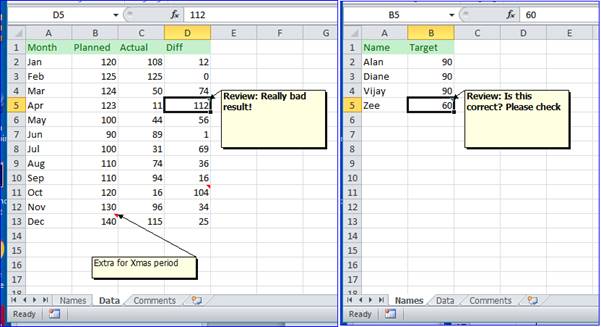
To make our example a bit more useful we're going to ignore all comments which aren't tagged with 'Review:' — so we want to ignore the comment in cell B13 on the Data sheet. The starting place for our VBA code is the Comments collection — this contains the set of Comments for a given range. This has the advantage that we don't have to check each cell to see if it contains a comment — we can check the entire sheet to see if there's a comment on it. In this code we're going to delete the content of the comments sheet each time the code runs, and we're assuming that a sheet called Comments already exists. The format we want is simple: 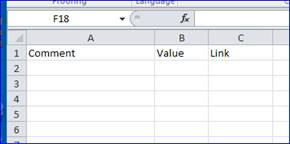
[Continued]
Excel/VBA Tutorials
Excel High School offers accredited Online High School courses for students nationwide.
|
Other recent reviews
|
 RSS Feed RSS Feed |
About | FAQ | Mailto:TechBookReport |